TL;DR & Key Takeaways
AI agents like ChatGPT Atlas and Microsoft Playwright read pages through the accessibility tree — the structural model screen readers use — because structured text is cheaper and more reliable than vision. Bots overtook humans as the majority of HTML traffic (57.2%, per Cloudflare Radar), yet WebAIM’s 2026 Million report shows 95.9% of home pages have detectable structure failures. If an agent can’t parse your listing’s structure, it can’t cite or recommend your product. Here’s what to fix.
- Optimize for the accessibility tree, not the visual layout — AI agents like ChatGPT Atlas and Microsoft Playwright read a page’s structural outline, not pixels, because structured text is cheaper and more reliable than vision models.
- Write descriptive alt text for every product image — WebAIM’s 2026 report found 53.1% of home pages omit it, which means those images contribute nothing to what an agent understands about your product.
- Use real, named buttons and put critical content in the initial HTML — with 30.6% of pages carrying empty buttons, many CTAs appear as nameless nodes an agent cannot confidently operate.
- Test your listing pages with an accessibility or ARIA snapshot — it shows exactly the roles, names, and structure an agent receives, so you can fix gaps before an agent marks your listing unreadable.
- Treat structure as an AI visibility channel, not a compliance task — WebAIM found 95.9% of home pages have detectable failures, and the same fixes that help screen-reader users help the agents that recommend products.
Your next customer might never see your product page. An AI agent will read it for them.
That sounds like an exaggeration until you look at the traffic. Cloudflare Radar measured automated bots at 57.2% of HTML web-page requests in the first week of June 2026, versus 42.8% human — the first time bots overtook humans on the web, and over a year earlier than Cloudflare’s CEO had forecast. A growing share of that automated traffic is not a scraper stealing your copy. It is a shopping agent, a citation retriever, or a browsing assistant trying to understand what you sell and whether to recommend it.
The problem is that these agents do not read your page the way a human does. They do not see your hero image, admire your layout, or notice your badge. They read a stripped-down structural model called the accessibility tree — the same representation screen readers have used for years. And according to a June 2026 Search Engine Journal analysis, most of the web is structured badly enough that agents struggle to parse it.
This article explains what the accessibility tree is, why every major AI agent now reads it instead of pixels, how bad the gap is, and the concrete fixes that make your listings legible to the machines doing the recommending.
What is the accessibility tree?
The accessibility tree is a structured, text-only representation of a web page’s meaning. It strips away colors, fonts, images, and layout, and keeps only the elements that carry information: headings, buttons, links, form fields, images (through their alt text), and the relationships between them.
The W3C defines it as a tree of accessible objects that represents the structure of the user interface, with each node exposing a role (button, heading, image), an accessible name (“Add to cart”), a state (expanded, checked), and how it nests inside other elements.
If you have ever used a screen reader or checked a page’s accessibility, you have already seen this tree. Every browser builds it automatically from the HTML. The key insight for AI search is that the accessibility tree is also exactly what a browsing agent receives when it tries to understand a page without rendering it visually.
Why AI agents read structure, not pixels
Two of the most widely used agent toolkits are explicit about this. Microsoft’s Playwright MCP server — an open-source project with over 34,000 GitHub stars that lets coding and shopping agents drive a browser — states plainly that it uses Playwright’s accessibility tree, not pixel-based input, and that no vision models are needed because it operates purely on structured data. It markets this as faster, lighter, and more deterministic than screenshot-based approaches.
OpenAI’s own guidance for publishers and developers says the same thing about ChatGPT’s browsing agent: it uses ARIA tags — the labels and roles that support screen readers — to interpret page structure and interactive elements, rather than relying on visual rendering.
The reasoning is practical. Sending a screenshot to a vision model is expensive in tokens and prone to hallucination. The accessibility tree is compact, deterministic, and already built by the browser. For an agent that needs to find a price, read a description, click a button, or decide whether a product matches a query, structure is simply a better input than pixels.
That flips the optimization problem. For the last decade, you optimized for a human eye and a search-engine crawler that parsed raw HTML. Now you also optimize for an agent that reads a semantic outline of your page. If that outline is empty, broken, or unlabeled, your product is invisible to the agent even when the page renders perfectly in a browser.
The data: most sites fail the agent readability test
This is not a hypothetical risk. WebAIM’s 2026 Million report, which audits the accessibility of the top one million home pages, found that 95.9% had detectable WCAG conformance failures — up from 94.8% the year before, and the first regression in six years. The average page now has 56.1 detected errors, a 10% increase year over year, spread across roughly 1,437 elements per page (a 22.5% jump in page complexity).
WebAIM notes that 96% of all detected errors fall into just six categories, and almost every one of them directly degrades what an agent can read:
- Low contrast text affected 83.9% of pages (less relevant for agents, which do not see color).
- Missing image alt text affected 53.1% of pages — meaning the image contributes nothing to the agent’s understanding.
- Missing form labels affected 51% of pages — inputs an agent can see but cannot name.
- Empty links affected 46.3% of pages — navigation an agent cannot interpret.
- Empty buttons affected 30.6% of pages — controls an agent cannot confidently operate.
- Missing document language affected 13.5% of pages.
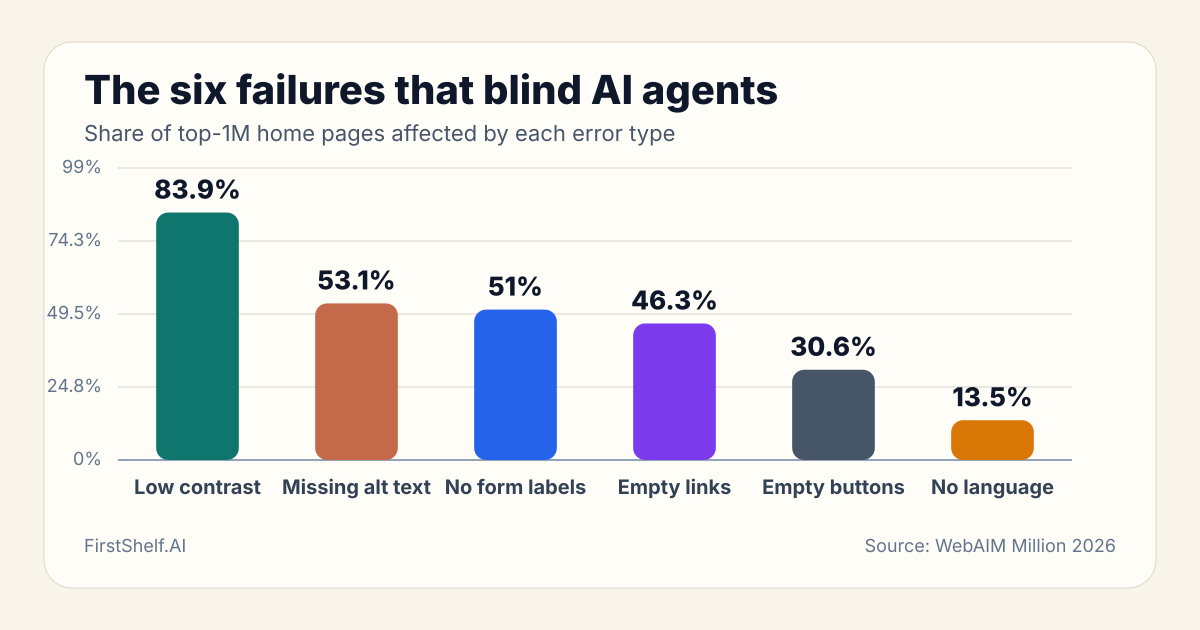
When the same defects block a screen reader and an AI agent, accessibility work stops being a compliance afterthought and becomes an AI visibility channel. The structure that helps a screen-reader user find your price is the structure that helps ChatGPT cite your product.
Five fixes that make your listings agent-readable
You do not need to rebuild your store to improve this. Most of the wins are the same discipline that helps traditional SEO and conversion — just with a new reason to prioritize it.
1. Write descriptive alt text for every product image
Over half of all home pages leave images without alt text. For an agent reading the accessibility tree, an unlabeled image is a nameless node that carries no product information. Your alt text is where visual proof — product condition, color, dimensions, scale, included accessories — becomes legible to the agent. Describe what the image shows, including the product name and the key attribute a buyer would verify visually.
2. Use real, named buttons for every action
If your “Add to cart” or “Buy now” control is a styled division with a click handler instead of an actual button element, it may appear in the accessibility tree as a roleless, nameless node an agent can see but cannot confidently operate. Use native button elements, and give each one a clear accessible name. With 30.6% of pages carrying empty buttons, this is a common blind spot for agentic checkout flows.
3. Put critical content in the initial HTML
Content that only appears after client-side JavaScript runs may never reach the accessibility tree an agent reads on its first pass. Your product title, price, key specifications, and availability should be in the server-rendered HTML, not injected later by a framework. This is the foundation of semantic density: the meaning an agent can extract without waiting for a script.
4. Build a clean heading and label hierarchy
Agents navigate by structure. A logical heading order (one main concept, supporting sub-sections), descriptive labels on every form field, and link text that says what the link does (not just “click here”) all feed the tree the agent parses. Broken or skipped headings make it harder for the agent to locate the passage that answers a buyer’s question.
5. Test with an accessibility snapshot before it costs you
You can see exactly what an agent sees. Browser developer tools include an accessibility-tree view, and tools like Playwright can export an ARIA snapshot — a structured outline of your page’s roles, names, and nesting. Run it against your top product pages. If your product name, price, or primary action do not appear with a clear role and an accurate name, fix the markup before an agent decides your listing is unreadable.
What marketplace sellers actually control
If you sell on a platform like Etsy, Amazon, or eBay, you cannot edit the underlying HTML of the marketplace itself. But the accessibility-tree principle still applies to the content you do control, and it matters more than it first appears.
On most marketplaces, you write the listing title, the description, the attributes and tags, and — where the platform allows — image alt text and filenames. Each of those becomes a node the agent reads. A title that leads with the product category and key attribute, a description structured in short labeled sections rather than a wall of text, and image filenames and alt text that name the product all raise the chance the agent extracts an accurate, citable representation of what you sell.
If you also run your own storefront, the five fixes above apply in full. And because agents increasingly browse across both your marketplace listings and your own site, consistency between them reinforces your entity signals — the same consistency that helps AI engines decide what to recommend, not just what to cite.
How FirstShelf can help
The accessibility tree is ultimately a question of how much meaning an AI agent can extract from your listing. FirstShelf’s GEO audit scores your listings on the signals that map directly to agent readability — semantic density (is the product meaning in the content, not locked in an image?), structure quality (are titles, sections, and attributes in a logical, parseable order?), entity authority, platform fit, and visual proof (does the image evidence match the text claims?). The free audit surfaces exactly where a listing loses meaning an agent would otherwise extract and cite.
To see how your listings score on these signals, run a free FirstShelf GEO audit at firstshelf.ai. The same audit that flags a missing alt text or a thin description shows you the rewrite that makes the listing legible to the agents doing the recommending.
Is your listing readable by AI agents?
FirstShelf's free audit checks the structure signals — headings, alt text, named buttons — that agents parse before they can recommend you.
Run a Free Structure AuditFrequently Asked Questions
What is the accessibility tree in web design?
The accessibility tree is a text-only, structured representation of a web page that the browser builds automatically from the HTML. It keeps each element’s role (button, heading, image), accessible name, state, and nesting, while stripping away colors, fonts, and layout. Screen readers use it, and increasingly AI agents read it too because it is compact and deterministic. The W3C defines it as a tree of accessible objects representing the page’s user-interface structure.
Do AI agents read pixels or the accessibility tree?
Most browsing agents read the accessibility tree. Microsoft’s Playwright MCP states it operates on the accessibility tree rather than pixel-based input and needs no vision models, and OpenAI says ChatGPT’s agent uses ARIA tags to interpret page structure. Structured text is cheaper and less error-prone than screenshots, so agents prefer it for finding prices, descriptions, and actions.
How does accessibility affect AI search visibility?
Because agents parse the accessibility tree, the same defects that block screen readers block agents. Missing alt text, empty buttons, and unlabeled links make a page harder for an agent to interpret, which can mean your product is not cited or recommended. WebAIM’s 2026 report found 95.9% of home pages have detectable failures, so most sites are harder for agents to read than they should be.
Can marketplace sellers improve accessibility for AI agents?
Yes, through the content they control. Even on platforms where you cannot edit the HTML, your listing title, structured description, attributes, image filenames, and alt text each become nodes the agent reads. Leading with the product category and key attribute, using short labeled sections, and naming images accurately all help the agent extract a correct, citable representation of your product.
Glossary
- Accessibility Tree
- A browser-built, text-only representation of a web page that exposes each element’s role, accessible name, state, and nesting while omitting visual styling. Screen readers and AI agents both parse it to understand a page without rendering pixels.
- ARIA (WAI-ARIA)
- A W3C specification that adds roles, states, and properties to HTML so assistive technology can interpret dynamic and complex interfaces. AI browsing agents use ARIA tags the same way screen readers do to understand structure and interactive elements.
- AI Agent Readability
- How completely and accurately an AI browsing agent can extract meaning from a page by reading its accessibility tree. High readability depends on descriptive alt text, named controls, logical headings, and server-rendered critical content.
- Alt Text
- Short descriptive text applied to an image that becomes the image’s accessible name in the accessibility tree. Without it, an image is a nameless node that carries no product information for screen readers or AI agents.
Sources
- Search Engine Journal — The Accessibility Tree Is How AI Agents Read Your Site & It’s Breaking - June 24, 2026 analysis explaining how ChatGPT Atlas and Playwright MCP read the accessibility tree, with Cloudflare Radar’s 57.2% bot-traffic figure and OpenAI’s ARIA-tag guidance.
- WebAIM — The WebAIM Million (2026 report) - Annual audit of the top one million home pages. 2026 edition reports 95.9% had detectable WCAG failures, 56.1 errors per page, and per-category rates for missing alt text, empty buttons, and empty links.
- Microsoft — Playwright MCP server (GitHub) - Official repository for Microsoft’s browser-automation server for agents. README confirms it uses Playwright’s accessibility tree, not pixel-based input, and needs no vision models.
- W3C — WAI-ARIA 1.2 specification - Authoritative specification defining the accessibility tree as a tree of accessible objects representing the structure of the user interface, with roles, states, and properties.
Related Articles
Google's Business Agent Is Now a Shopify Job
Google's Business Agent — a branded AI assistant on Search fed by your Merchant Center feed — can now be enabled from the Google & YouTube app in Shopify. Here is the listing data it reads and what to fix before you publish it.
7 min readShopify Now Stores 20 Variant Barcodes
Shopify now lets a variant hold 20 typed barcodes, but sales channels still send only the first. Put the manufacturer GTIN in slot one so AI shopping can match the product.
7 min readCloudflare Now Writes Your robots.txt
Cloudflare's Bot Preference Sync generates your robots.txt from dashboard policy. The real change for sellers is the Training control's new split: Block removes crawlers at the edge, Disallow keeps you in AI search answers while saying no to training.
9 min read